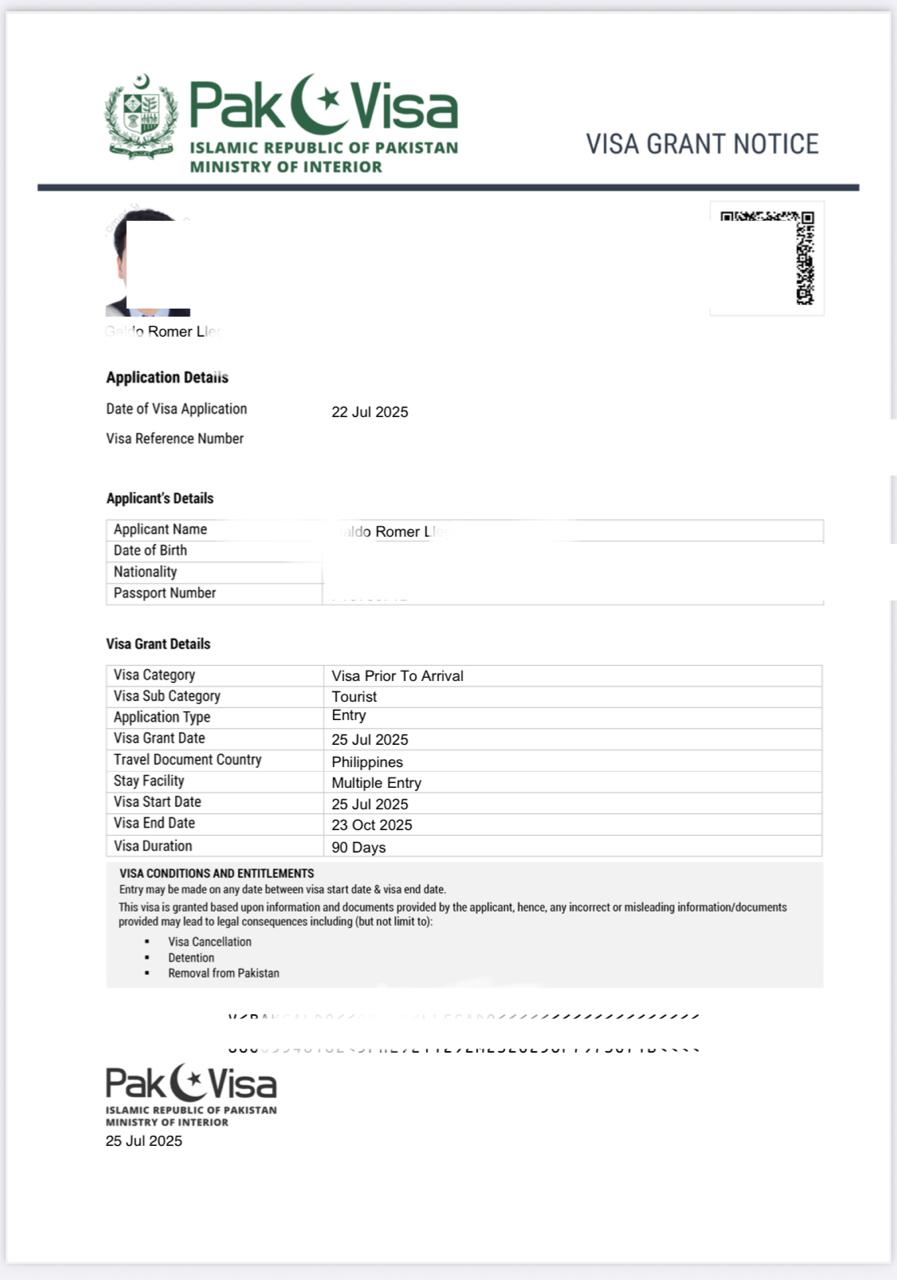
If you’re a Filipino planning to visit Pakistan, whether for travel, visiting friends, or pure curiosity, here’s the good news: the Pakistan e-Visa system is incredibly easy, fully online, and often free, even for multiple-entry visas.
This guide includes exact steps, personal notes from my own successful application, and what you can expect when you land in Islamabad International Airport.
Why Visit Pakistan?
Pakistan is honestly one of the most underrated destinations for Filipinos, with mountains, lakes, dam-blue waters, historic forts, cultural sites, and unbelievably warm people.
But before the adventure begins? Let’s get the visa sorted.
✔️ Pakistan Visa Type for Filipinos
The most common option, and the one I personally used:
✓ Tourist Visa (e-Visa System)
• Mode: Online
• Category: Tourist Visa
• Entry Type: Single or Multiple Entry
• Processing Time: 24–72 hours (mine took less than 48 hours)
• Fee: Free for Filipinos, including multiple entry
• Validity Granted to Me: 90 days, multiple entry
• Type: Visa Prior to Arrival
Yes, multiple entries + 90 days can be granted at no cost.
✔️ Requirements for Filipino Applicants (Actual & Updated)
Here are the documents I personally uploaded:
- Passport
• Valid for at least 6 months
• Clear scan of the bio-page - Passport Photo
• White background
• Passport-style
• Under 500 KB - UAE Emirates ID (optional but helpful)
Since I’m an OFW in Dubai, I uploaded my Emirates ID.
This was accepted without issue.
- Hotel Booking
• A tentative booking works.
I used my pre-reservation from Booking.com.
The hotel’s address and phone number were used in the application form.
💡 Flight itinerary NOT required.
When I applied in July, I didn’t have any flight details for my trip in October, and that was perfectly fine.
- Purpose of Visit
Just choose Tourism.
No long explanation needed.
❗ Important for Filipinos: Entering Your FULL Name Correctly
The portal does NOT have a separate field for Middle Name.
So you MUST input your middle name this way:
Given Name / First Name field → First Name + Middle Name
Example:
If your name is Juan Santos Cruz:
• Given Name: Juan Santos
• Surname: Cruz
If you don’t include your middle name, they will send a correction request (this happened to me).
✔️ Step-by-Step Guide: How I Got My Pakistan e-Visa
Step 1: Go to the Official Pakistan Visa Portal
Search:
“Pakistan Online Visa System (Nadra)”
Create an account → verify your email.
This is the only legitimate portal.
Step 2: Select Visa Type
Choose:
Tourist Visa → First Time Entry → Apply Now
Step 3: Fill Out Your Personal Information
You’ll enter:
• Full name (follow naming rule above)
• Passport details
• Home address (PH or UAE)
• Occupation
• Travel history
Be accurate; they check inconsistencies.
Step 4: Upload Your Documents
I uploaded only:
• Passport bio-page
• Passport photo with white background
• Emirates ID
No flight tickets required.
Step 5: Submit and Monitor the Status
After submission, you’ll get:
• Confirmation email
• Application number
Processing Time:
24–72 hours (mine took less than 48 hours).
⚠️ Important: Sometimes they do NOT send a “Visa Approved” email.
In my case, the approval appeared in the portal, but no email was sent.
So make sure to:
- Log in to check regularly
- Use your application number to track status
✔️ Additional Step: Check-In at Your Departure Airport
At DXB, even with a printed copy of my approved visa, the counter staff still double-checked it in their system.
They:
• Took a photo of my visa
• Sent it to their internal group
• Waited for confirmation
This process took around 15 minutes, so give yourself extra time.
✔️ What Happens When You Arrive in Pakistan?
- Go to Immigration (Foreign Passport Counter)
Super quick and straightforward.
- No Questions Asked
They did NOT ask me for:
• Hotel booking
• Purpose of visit
• Return ticket
• Local contact
Nothing.
They just checked the passport and visa, stamped it, and waved me through.
- Baggage Claim Takes Time
Be patient, it’s slower than Dubai standards.
- Expect People to Mistake You for Chinese
Not a big deal, just a curiosity. Filipinos are not common travelers there.
✔️ Tips for Filipino Travelers Applying for Pakistani Visa
- Hotel booking is enough, no need for invitation letters unless you really want to.
- Avoid using non-tentative hotels far from your planned area; it’s okay to use a placeholder booking.
- Save your visa in PDF + screenshots.
- Check the portal manually since approval emails aren’t always sent.
✔️ Is It Really Free?
Yes, as of my application:
✔ Multiple entry
✔ 90-day validity
✔ Tourist visa
✔ Visa prior to arrival
✔ Filipino passport
All FREE.
✔️ Final Thoughts
The Pakistan e-Visa process is honestly one of the smoothest I’ve ever experienced as a Filipino traveler. Everything was fast, legit, and completely online. As long as you enter your middle name correctly and upload clear documents, you’ll be good to go.
 discover with romer
Leave a comment